 Simon
Simon
·
Dev Log DevKnife Update 1.5.0
DevKnife 1.5.0 introduces a new Regex Tester, an SVG Editor, and local file open/save support for the Markdown Editor.
Read MoreIn version 1.8.0 of DevKnife, I’ve added a module switcher with fuzzy search that transforms how you navigate between tools. This update focuses on speed and efficiency, letting you jump to any tool with just a few keystrokes.
Beyond the quick search, this release brings drag-and-drop support to the SVG Editor, performance improvements to the Time Inspector, and fixes for visual inconsistencies in the text editors.
Switching between tools usually means scanning the sidebar or navigating back to the dashboard. The new quick search feature eliminates that friction entirely by letting you jump to any tool in milliseconds.
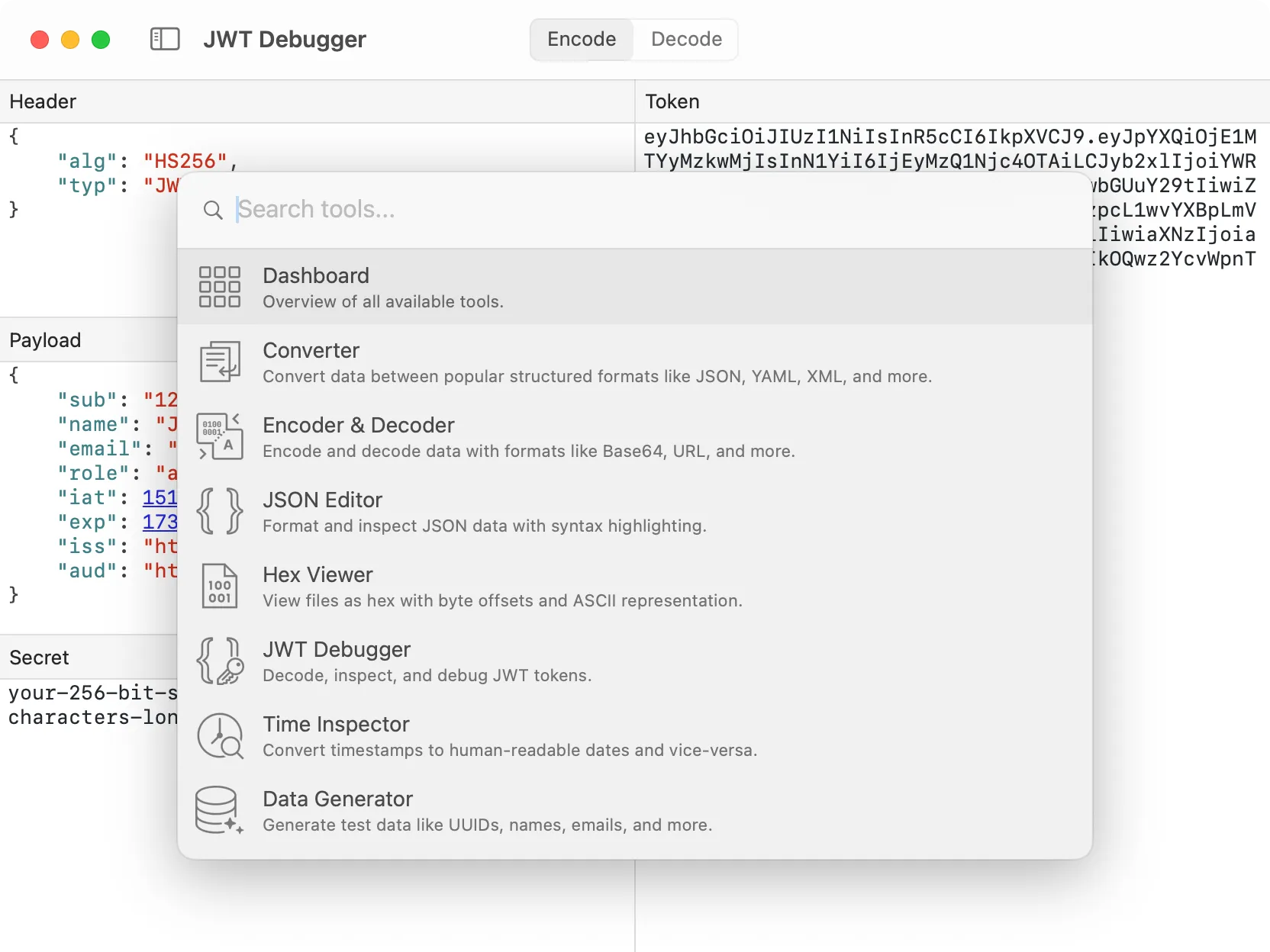
Type a few letters to instantly find and switch to any tool.
The feature is designed for keyboard-driven workflows:
Fuzzy matching: Type partial names or abbreviations. “jd” finds JSON Debugger, “hc” finds HTTP Client, “tx” finds Text Inspector. The search understands what you’re looking for even with incomplete input.
Instant results: Matches appear as you type, with the most relevant tool highlighted. Just press Enter to switch immediately.
Keyboard-first: Access quick search from anywhere in the app with Cmd+P. No mouse required.
For power users juggling multiple tools throughout the day, quick search makes DevKnife feel significantly faster and more responsive.
The SVG Editor now accepts files dropped directly into the editor pane. Previously, you needed to use the File menu to open SVG files. Now you can simply drag an icon from Finder and drop it into the editor to start working immediately.
This small change removes friction from the most common workflow and makes the SVG Editor feel more intuitive for quick edits.
Version 1.8.0 includes several refinements to polish the experience:
Text editor theme fix: Resolved an issue where text editors showed a white background when macOS was in light mode but DevKnife was forced to dark mode. The editors now respect your DevKnife theme setting regardless of system preferences.
Time Inspector performance: Improved rendering performance when toggling the sidebar in the Time Inspector, making the interface feel more responsive during navigation.
That’s everything for version 1.8.0. The quick search feature is a small addition that makes a big difference in daily use. Once you start using it, navigating DevKnife without it will feel noticeably slower.
If you haven’t yet, grab the latest version and try the quick search for yourself. As always, your feedback helps shape future updates.
DevKnife 1.5.0 introduces a new Regex Tester, an SVG Editor, and local file open/save support for the Markdown Editor.
Read More
Fast, private, and built for macOS.