 Simon
Simon
·
Guide How to Open and Edit CSV Files on Mac Without Excel or Numbers
Learn lightweight ways to open, inspect, and edit CSV files on macOS without launching Excel or Numbers, using a text editor, Terminal, or DevKnife's CSV Editor.
Read MoreLanguage models don’t read characters or words. They read tokens. Every model has a context window measured in tokens, every API bills per token, and questions like “will this prompt fit?” or “how much will this cost?” come down to a single number: the token count.
The catch is that the count is different for every model, and no single command does all of them. This guide covers how to count tokens from the command line: the exact way for ChatGPT with tiktoken, how Claude and Gemini differ, and a faster option for when you check token counts a lot.
A token is a chunk of text that a model treats as a single unit, often a short word, part of a longer word, or a piece of punctuation. A rough rule of thumb for English is about 4 characters per token, or roughly ¾ of a word, so 1,000 tokens is around 750 words.
But it really is only a rule of thumb:
That last point is the important one: there’s no single “token count” for a piece of text, only a count per model.
For ChatGPT, the standard command-line option is the Python library tiktoken. It gives you an exact count locally, using the same tokenizer the API uses on the input side.
Install it:
pip3 install tiktokenThen count the tokens in a string:
import tiktoken
enc = tiktoken.encoding_for_model("gpt-4o")text = "How many tokens is this sentence?"print(len(enc.encode(text)))
encoding_for_model picks the right encoding for the model you name. GPT-4o uses o200k_base, while older GPT-3.5/4 models use cl100k_base. You don’t have to know which; just pass the model name.
To count a whole file from the Terminal:
python3 -c 'import tiktoken, sys; print(len(tiktoken.encoding_for_model("gpt-4o").encode(sys.stdin.read())))' < prompt.txt(There is also a web tokenizer for ChatGPT, but the visual tool tends to lag behind the newest encodings. tiktoken is the reliable route.)
Here’s where it gets awkward: tiktoken is only for ChatGPT. Claude and Gemini use different tokenizers, and neither is a drop-in library the way tiktoken is.
count_tokens method that likewise calls the model to get the count.Both are accurate, but both mean wiring up an API key, installing an SDK, and making a network request just to find out how long your text is. So checking one prompt across all three models means juggling three methods and two API keys, plus a couple of network round-trips, all to read off a handful of numbers. For something you check constantly while writing prompts or trimming context to fit a window, that’s a lot of overhead for a length check.
DevKnife’s Text Inspector shows token counts for ChatGPT, Claude, and Gemini side by side as you type or paste. Instead of running a separate script per model, you drop in your text and read the numbers directly.
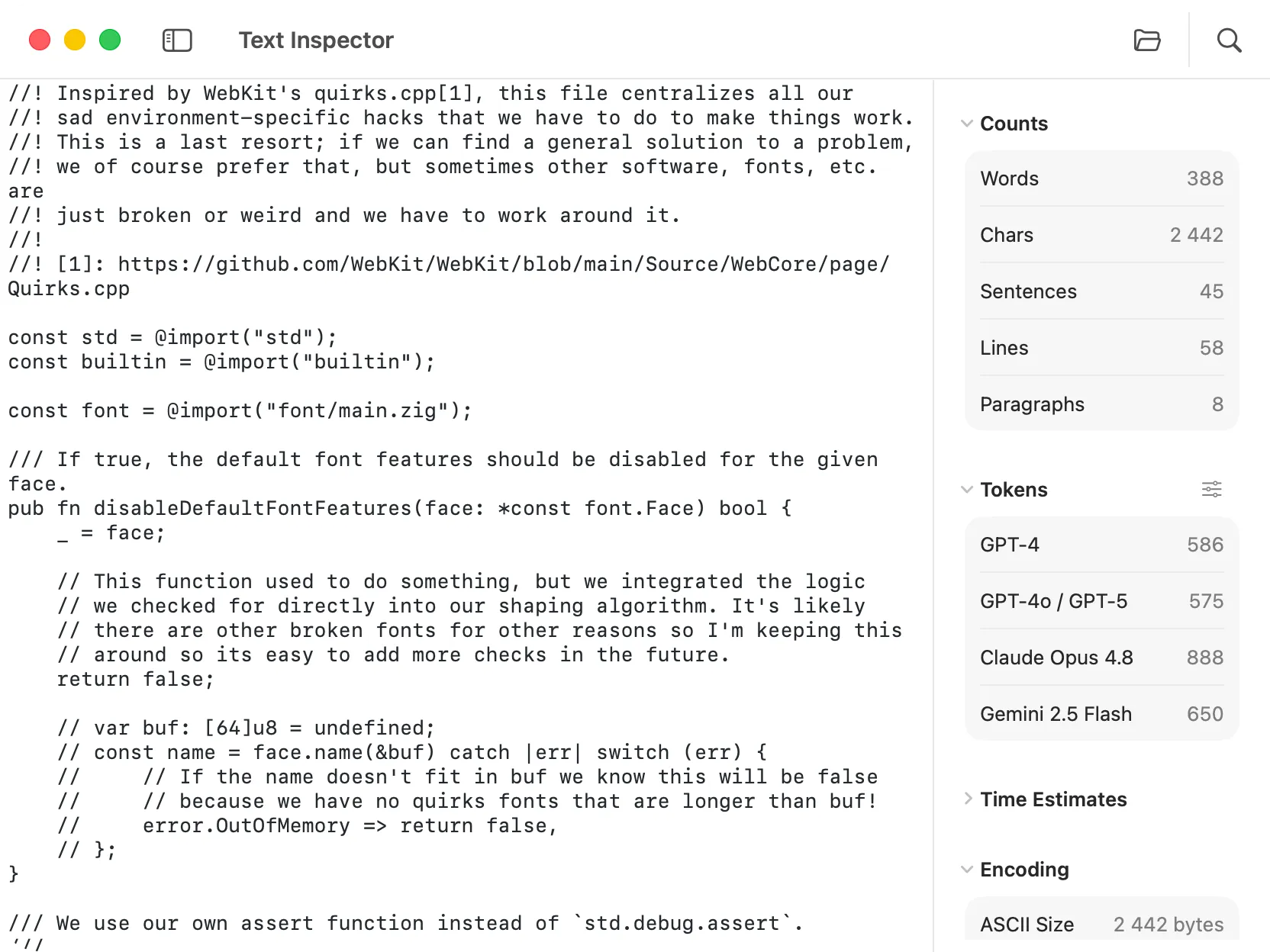
Text Inspector shows token counts for ChatGPT, Claude, and Gemini alongside word, character, and line counts.
Alongside the token counts, you get the everyday text stats in the same panel:
So one view answers both “will this prompt fit the context window?” and “how long is this text?” without leaving the app.
Privacy here isn’t all-or-nothing, and it’s worth being precise. ChatGPT counts are computed locally, so that text never leaves your Mac. Claude and Gemini are different: those counts come from Anthropic’s and Google’s official APIs, so the text does reach them. But that’s the same first party you would send the prompt to anyway, and it’s a real step up from a random web tokenizer. Many of those wrap the same official APIs while adding an unknown middleman that can log or keep whatever you paste.
For ChatGPT, tiktoken gives you exact counts locally and is worth knowing. The friction is everything around it: Claude and Gemini each need their own API, and checking a single prompt across all three means juggling separate tools and keys.
When you’re regularly counting tokens (budgeting context, estimating cost, or trimming a prompt to fit), DevKnife’s Text Inspector puts all three counts in one place, right next to the rest of your text stats.
Learn lightweight ways to open, inspect, and edit CSV files on macOS without launching Excel or Numbers, using a text editor, Terminal, or DevKnife's CSV Editor.
Read More
Fast, private, and built for macOS.