 Simon
Simon
·
Guide How to Count Tokens for ChatGPT, Claude, and Gemini
Learn how token counting works for ChatGPT, Claude, and Gemini, why each model counts differently, and how to check prompt length with DevKnife's Text Inspector.
Read MoreIn version 1.6.0 of DevKnife, I’ve added a full-featured HTTP Client for testing REST APIs and HTTP endpoints, significantly improved the theming system, and made the JWT Debugger smarter by connecting it directly to the Time Inspector.
This update focuses on making API development workflows smoother and giving you more control over how DevKnife looks and feels.
Testing APIs usually means reaching for browser extensions or separate apps. The new HTTP Client brings that capability right into DevKnife with a clean, file-based approach that keeps everything offline and under your control.
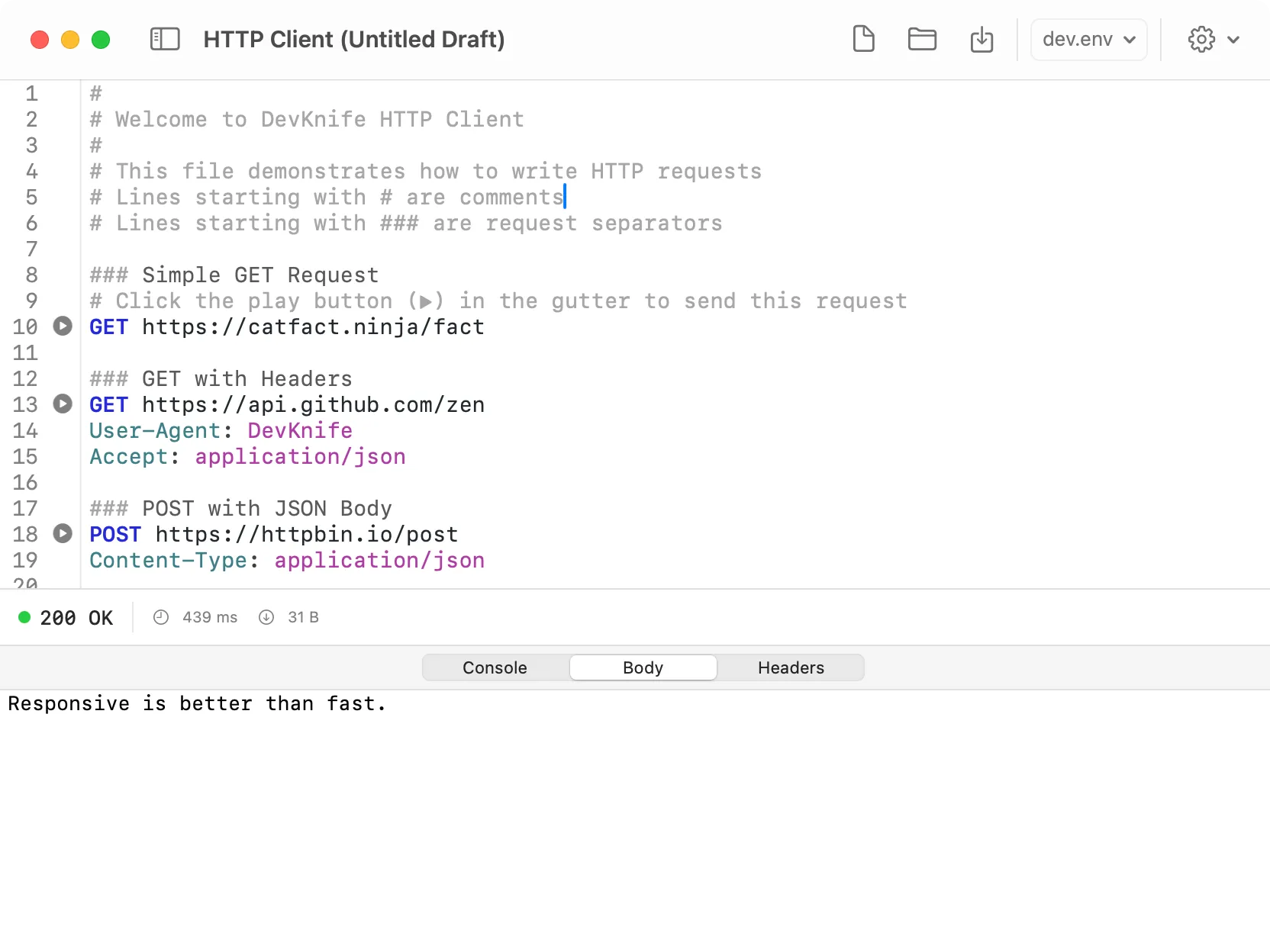
Write HTTP requests in a simple text format and see responses instantly.
The tool is designed around simplicity and power:
Text-based requests: Write requests in a clean .http file format. No complex UI, just HTTP methods, headers, and bodies.
Variables and environments: Define reusable variables with @variableName = value syntax. Load environment-specific values from .env files to switch between development, staging, and production endpoints.
Named requests and response caching: Add # @name requestName to any request, then reference its response data in later requests using {{requestName.response.body.field}}. Perfect for chaining API calls.
Execute anywhere: Click the play button in the gutter next to any request, or press Cmd+Enter from anywhere within a request block to run it instantly.
Stop running requests: The play button changes to a stop button while a request is active, letting you cancel long-running operations.
File operations: Save your request collections as .http files, open existing ones, and organize your API tests however you like. The title bar shows unsaved changes with a dot indicator.
Layout options: Switch between side-by-side and stacked views via the settings menu to match your screen size and preferences.
Demo file on first launch: Open the HTTP Client for the first time and you’ll see a pre-loaded demo file with examples covering all major features: variables, headers, request chaining, and more.
Everything runs locally. Your API keys, tokens, and request data never leave your Mac.
The JWT Debugger now connects directly with the Time Inspector. When decoding or encoding tokens, the timestamp fields (exp, iat, and nbf) appear as clickable links with a dashed underline. Click any of them and DevKnife instantly switches to the Time Inspector with that timestamp pre-loaded.
This makes it trivial to check when a token expires, when it was issued, or when it becomes valid. No more copying values between tools or doing mental math on Unix timestamps.
Version 1.6.0 refines the visual foundation of DevKnife with new default themes and more control over how text editors look:
Default color scheme improvements: The built-in light and dark themes have been polished for better readability and contrast.
Additional themes: Added new theme options in Settings, including popular color schemes like Catppuccin and Tokyo Night variants.
Font customization: Choose your preferred editor font family and size in Settings. Whether you prefer SF Mono, Monaco, or another monospace font, DevKnife adapts to your workflow.
These improvements apply across all text-based tools, including the JSON Editor, Regex Tester, HTTP Client, and more.
Beyond the headline features, 1.6.0 includes a handful of smaller enhancements:
UTC time zone in Time Inspector: UTC now appears as a selectable time zone when you search for “utc”, “coordinated”, or just “u”. Useful for working with server logs and international teams.
Status bar theme support: Error and info messages in the JWT Debugger now respect your theme’s background color for a more cohesive appearance.
That’s everything for version 1.6.0. From testing REST APIs without leaving DevKnife to customizing your workspace with new fonts and themes, this update makes the app more powerful and personal.
If you haven’t yet, grab the latest version and give the HTTP Client a try. As always, your feedback helps shape future updates.
Learn how token counting works for ChatGPT, Claude, and Gemini, why each model counts differently, and how to check prompt length with DevKnife's Text Inspector.
Read More
Fast, private, and built for macOS.